Section 6 Tera Calculation Software Structure
Explanation of Tera Calculation software structure and data processing mechanics.
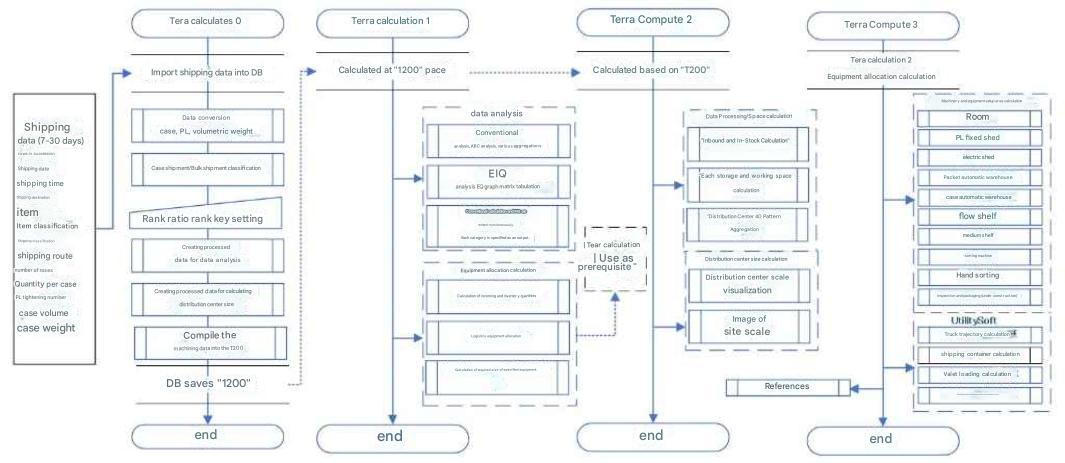
This software is composed of three stages (Tera Calculation 0 to 2) spanning data processing, analysis, and simulation, each fulfilling an indispensable role in deriving distribution center scale.
1. Basic Software Flow
Tera Calculation executes computations from upstream to downstream in the following flow:
- Tera Calculation 0 (Shipping Data Processing):
- The core foundation phase of the analysis.
- Processes shipping data and stores the common dataset used for calculations in Access table "T200".
- Tera Calculation 1 (Shipping Data Analysis & Equipment Allocation):
- Based on table "T200", classifies shipping ranks into 25 categories using EIQ analysis and outputs them to an EIQ matrix table.
- Allocates equipment and facilities to these categories to calculate required equipment scale.
- Tera Calculation 2 (Center Scale & Site Area Calculation):
- Estimates receiving and inventory volumes, summarizing required floor areas for each equipment type according to Tera Settings.
- Automatically calculates 40 building scale patterns (building floors, dock bays, etc.) and visualizes layout boundaries with plot site area.
- Tera Calculation 3 (Utilities):
- Includes educational utility tools for calculating individual equipment areas separately.
2. Relationship Between Internal Data and External Data
Data handled by the software is categorized into "fixed" and "variable" components:
- Internal Data (Variable):
- The default values upon software launch are the Tera Settings.
- Certain numerical parameters can be modified within the software, immediately reflecting changes in recalculation results.
- External Data (Fixed):
- Refers to "Shipping Data" and "Logistics Equipment Data", located in the "Tera Calculation Data Folder".
- Shipping data is strictly fixed; modifications require closing the software to replace data files.
3. Calculation Function Flexibility
To support multi-angle analytical perspectives, the following aggregation features are built in:
- Diverse Conversion Units: Output volumes can be toggled among piece count, retrieval frequency, case conversion, pallet conversion, volume, and weight.
- Condition Filtering: Enables targeted filtering specifying "Shipping Time", "Shipping Route", "Item Category", and "Shipping Category".
- Categorized Aggregation: Case-unit shipping and piece-unit shipping are strictly differentiated and processed across all aggregations.
Subsection 1 Software Flowchart
Tera Calculation 0_Shipping Data Processing
Pre-calculates frequently used calculation logic required by Tera Calculation 1 and Tera Calculation 2, storing them in Access (Table "T200").
Tera Calculation 1 and Tera Calculation 2 perform calculations using "T200" as their core foundation.
Tera Calculation 1_Shipping Data Analysis & Equipment Allocation
Uses EIQ analysis to categorize shipping data into 25 rank classifications and outputs them to an EIQ matrix table.
Furthermore, assigns machinery and equipment to the EIQ matrix table to determine required facility capacity.
Tera Calculation 2
Calculates receiving volume and inventory volume, summarizes required area for equipment according to Tera Settings, and automatically computes distribution center scale and site area.
Allows altering one or multiple Tera Settings, executing full recalculations reflecting all revised parameters.
Calculates 40 building scale patterns considering floor counts and dock bays. Designed to help visualize spatial trade-offs between building scale and plot size.
Tera Calculation 3
Utility software for calculating area requirements of individual logistics equipment.
After determining equipment requirements in Tera Calculation 1, users calculate areas per equipment item to configure total distribution center scale.
Modeled after procedures in Tera Calculation 2, users learn distribution center scale configuration in Tera Calculation 3.
Reference materials are also attached.
Common Features Across Tera Calculation
Differentiates and aggregates case-unit shipping versus piece-unit shipping.
Provides selectable output views for retrieval frequency, piece count, case conversion, pallet conversion, volume conversion, and weight conversion.
Enables conditional filtering output by specifying "Shipping Time", "Shipping Route", "Item Category", and "Shipping Category".
In addition, conventional calculation methods and EIQ analysis methods are computed simultaneously for comparative verification.
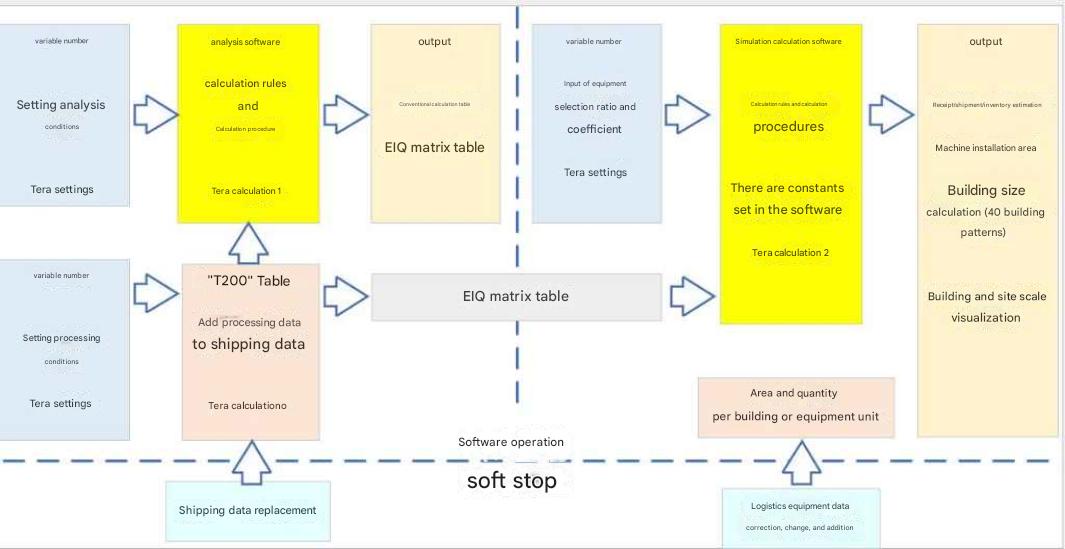
Internal Software Data vs. External Data
Internal software data consists of variable parameters, initialized to Tera Settings upon startup.
External data, namely "Shipping Data" and "Logistics Equipment Data", are fixed values; file replacements must be performed when the software is stopped.
These external datasets are stored in the "Tera Calculation Data Folder".
The structural relationship between the software, variable data, and fixed data is depicted on the left.
Note: While "Shipping Data" is completely fixed, certain logistics equipment parameters can be modified within the software. Calculations and displays update based on revised values, but underlying external data files remain unchanged. Upon restarting, calculations revert to loading external data files.
Detailed Explanation
Reiterating key structural points:
Processed data from Tera Calculation 0 is saved in Access Table "T200". All calculations in Tera Calculation 1 and Tera Calculation 2 are derived from "T200".
Tera Calculation 1 integrates concepts of volume and time into EIQ analysis, categorizing data into 25 rank classifications displayed in an EIQ matrix table. While base shipping data volume is in piece count, output can be toggled to retrieval frequency, case conversion, pallet conversion, volume conversion, and weight conversion. Conditional filtering outputs can also be generated by specifying "Shipping Time", "Shipping Route", "Item Category", and "Shipping Category". Furthermore, conventional calculation methods such as item summaries and destination summaries are computed simultaneously for verification.
Tera Calculation 1 calculates necessary values for system design, including equipment selection and storage capacity / throughput configuration.
Tera Calculation 2 estimates inventory volume and receiving volume from shipping data, selecting pre-configured storage equipment and material handling machinery to calculate distribution center scale. It calculates 40 building scale patterns considering building stories and dock bays, designed to facilitate visual understanding of building scale and site plot trade-offs.